I recently ran into in an old friend of mine who gave me a USB flash drive with a file that he wanted me to print. As soon as I plugged it into my PC's USB port, my Anti-virus software flashed a loud alarm - "Virus Detected"!! I asked my friend if he has an anti-virus software running on his PC and he said he does. So, why was the virus not caught? His anti-virus software was not getting definition updates!!! Anti-virus software is useless without frequent definition updates.
Microsoft recently released Microsoft Security Essentials (MSE) for Windows based PCs. Check out how MSE compares to other anti-virus software in the market -> http://arstechnica.com/security/news/2009/10/av-comparatives-picks-six-malware-removal-winners.ars. One of the critical elements of any anti-virus software package is automatically updated virus definitions. Most anti-virus vendors provide you limited automatic updates for free and then whack you with an annual subscription for the updates. Microsoft Security Essentials gives you free automatic updates. Download it from here -> http://www.microsoft.com/Security_Essentials/. It's free for both home and business use as opposed to other companies' anti-virus software that are free for home use only.
I predict Google releasing an anti-virus software in the near future!! :-)
Monday, November 02, 2009


Friday, October 30, 2009
Passpack - Free Online Password Manager
My previous post was about KeePass, a password manager that can be used to store all your online/offline account information. KeePass stores the database on your PC and this somewhat limits portability of the password database, if you need to access the account information when you are away from the PC where this information is stored. KeePass data can be stored on a CD or a USB flash drive and you can keep this with you to access the information anywhere. There are some issues with this method ->
Concerned about your passwords being stored online? PassPack's website explains how the data is encrypted on your PC before it is transmitted to their servers. PassPack also went to great lengths to explain that since they are based out of Italy and their servers are in Switzerland [Swiss privacy laws are supposed to be very tough], you don't have to worry about your passwords being revealed due to some draconian legal wrangles.
Oh by the way, if you forget your packing key, you can kiss your password database goodbye. PassPack cannot recover your packing key if you lose it.
- You could lose the CD or USB Drive containing ALL or MOST of your online account information, defeating the whole purpose of storing them in a database in the first place.
- You need to synchronize the database between your PC and the USB/CD everytime you either add an account or modify account information.
Concerned about your passwords being stored online? PassPack's website explains how the data is encrypted on your PC before it is transmitted to their servers. PassPack also went to great lengths to explain that since they are based out of Italy and their servers are in Switzerland [Swiss privacy laws are supposed to be very tough], you don't have to worry about your passwords being revealed due to some draconian legal wrangles.
Oh by the way, if you forget your packing key, you can kiss your password database goodbye. PassPack cannot recover your packing key if you lose it.
Tuesday, September 22, 2009
KeePass - Opensource Password Safe
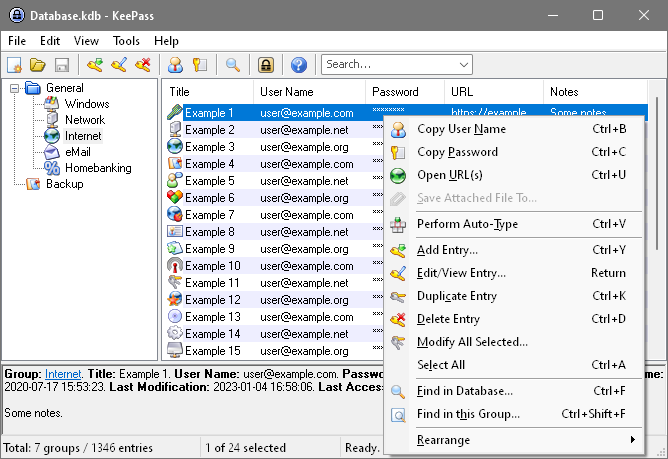
With the increase of online banking, online e-mail, online purchases, etc., there is a need for increased password security. If you are like many people who use the same password for most sites, you are in trouble if your password gets hacked. You need to make your passwords complex and tough to crack and create a separate password for each account. Once you create a different complex password for each site , the problem is how to remember these passwords. The last thing you want to do is write the passwords down on a paper or notebook and carry them in your wallet/purse.
KeePass is an open source utility that works on almost any platform, including your smartphone ( Clients available for Windows, Ubuntu, Linux, MacOS X, J2ME (Cell Phones), Blackberry, Windows Mobile and more). You can store your passwords in a password protected and encrypted database and use the passwords when needed. It will even generate a complex password for you. KeePass supports the Advanced Encryption Standard (AES, Rijndael) and the Twofish algorithms to encrypt its password databases. There are many plugins available that will allow things like filling forms, onscreen keyboard, etc.
Read more about KeePass here.
Saturday, July 25, 2009
Vyatta - Free alternative to Cisco, Juniper, etc.
Vyatta is a high-end, open source software that installs on your own hardware and provides standard WAN (wide area network) routing protocols such as RIP (Routing Information Protocol), OSPFv2 (Open Shortest Path First version 2), and BGPv4 (Border Gateway Protocol version 4). It also includes intranet networking protocols such as DHCP (Dynamic Host Configuration Protocol), VRRP and SNMP. Vyatta Community edition is free to use and can be downloaded from here. Vyatta is available as a standalone installation, as a VMWare Virtual appliance, and as a Citrix Xenserver Image. Get to know more about Vyatta.
Thursday, July 16, 2009
Amahi Home Server - Best free alternative to Windows Home Server
Want to backup your home desktops, centrally share your music, videos and important files, and do much more? Amahi is your answer. Amahi is open source and free to use. Install it on an old pc or laptop with enough harddisk space and get going. Why spend $100 on Windows Home Server software when you can do all the same and more with Amahi Home Server?
Here are some of the important features that are available to you from Amahi:
Get Amahi and get started!
Here are some of the important features that are available to you from Amahi:
- Easy backups of your PCs - protect your valuable data
- Audio Streaming
- Networking - DDNS, NAS, Web Server and more...
- VPN - Connect to your network and your home PCs from anywhere you have internet connectivity, securely
- File Sharing
- Calendars - see what every family member has planned for the week
- Disk Monitoring
Get Amahi and get started!
Sunday, July 12, 2009
Best free bare metal virtualization software
Bare metal virtualization software runs directly on the host's hardware as a hardware control and guest operating system monitor. You don't need an OS to run on the host hardware. This software is great for running multiple OS environments on a single physical host. You can consolidate your data center by cutting down on the number of physical machines and conserve energy. Get with the green program folks!
I looked at 3 of the free bare metal hypervisors in the market:
VMWare ESXi does not give you centralized management abilities for free. You need to purchase additional tools from VMWare to get this ability. Citrix and Oracle provide centralized management and many other features that are not available with VMWare for free. Oracle is still not very popular in the baremetal hypervisor market and needs to gain a lot of ground.
I personally found Citrix Xenserver to be the best among the available baremetal hypervisors for the following reasons:
There are some hardware requirements for these hypervisors. You need to have 64 bit CPUs that support either the Intel-VT or AMD-V hardware virtualization technology. There is also a very limited subset of hardware that these hypervisors are certified with. Make sure to check these requirements before making the jump into bare metal virtualization. The alternative is to go with a hosted hypervisor [a.k.a Type 2 hypervisor] such as Sun's Virtualbox, VMWare Server, or Microsoft VirtualServer.
I looked at 3 of the free bare metal hypervisors in the market:
VMWare ESXi does not give you centralized management abilities for free. You need to purchase additional tools from VMWare to get this ability. Citrix and Oracle provide centralized management and many other features that are not available with VMWare for free. Oracle is still not very popular in the baremetal hypervisor market and needs to gain a lot of ground.
I personally found Citrix Xenserver to be the best among the available baremetal hypervisors for the following reasons:
- A wide array of features required to run your servers available free of cost.
- Max support of 8 virtual CPUs vs. only 4 for ESXi
- Better hardware support for SATA harddrives out of the box [ESXi only supports SAS/SCSI - you need to hack it to make it work with SATA].
There are some hardware requirements for these hypervisors. You need to have 64 bit CPUs that support either the Intel-VT or AMD-V hardware virtualization technology. There is also a very limited subset of hardware that these hypervisors are certified with. Make sure to check these requirements before making the jump into bare metal virtualization. The alternative is to go with a hosted hypervisor [a.k.a Type 2 hypervisor] such as Sun's Virtualbox, VMWare Server, or Microsoft VirtualServer.
Thursday, October 09, 2008
VirtualBox - Best free desktop virtualization
VirtualBox is a very good desktop virtualization software from Sun Microsystems that is available for free. VirtualBox runs on Windows, Linux, Macintosh and OpenSolaris hosts and supports a large number of guest operating systems.
Truecrypt - Free on-the-fly file and disk encryption software
OpenOffice - An excellent free alternative to Microsoft Office
Openoffice is available for free for use an alternative to Microsoft Office. Download it from http://download.openoffice.org/index.html. Many institutions across the world are using this software. The software can install and run on Windows, Mac, and Linux. If you need to send any of the documents produced from Openoffice to anyone who needs it in a Microsoft format, you can do so. You can even open Microsoft formats with Openoffice [You will need to wait for OpenOffice 3 for Microsoft Office 2007 documents] . The upcoming OpenOffice 3.0 release has many features that would it make it a serious contender to Office 2007.
Wednesday, October 08, 2008
Peazip - Free file and archive manager utility
PeaZip is a free, open source file and archive manager.
It allows you to open archives of the following types:
PeaZip allows to save archive's layouts; apply powerful multiple search filters to archive's content; handle multiple archives at once; export job definition as command line; bookmark archives and folders etc.
Other features: AES256 encryption, robust file copy, split/join files (file span), secure file deletion, compare, checksum and hash files, system benchmark, generate random passwords and keyfiles.
PeaZip is cross platform, available as portable and installable software for 32 and 64 bit Windows (9x, 2000, XP, Vista) and Linux.
It allows you to open archives of the following types:
- ACE, ARJ, CAB, CHM, COMPOUND (MSI, DOC, XLS, PPT), CPIO, ISO, Java (JAR, EAR, WAR), Linux (DEB, PET/PUP, RPM, SLP), LHA/LZH, LZMA, Mac (DMG/HFS), NSIS, Open Office files, PAK/PK3/PK4, RAR, SMZIP, U3P, UDF, WIM, XAR, XPI, Z/TZ.
- 7Z, ARC, BZ2, GZ, PAQ/LPAQ, PEA, QUAD/BALZ, TAR, UPX, ZIP
PeaZip allows to save archive's layouts; apply powerful multiple search filters to archive's content; handle multiple archives at once; export job definition as command line; bookmark archives and folders etc.
Other features: AES256 encryption, robust file copy, split/join files (file span), secure file deletion, compare, checksum and hash files, system benchmark, generate random passwords and keyfiles.
PeaZip is cross platform, available as portable and installable software for 32 and 64 bit Windows (9x, 2000, XP, Vista) and Linux.
Miro - Free Media Player and so much more
Miro is a media player that can play any format [MPEG, Quicktime, AVI, H.264, Divx, Windows Media, Flash Video, and more]. It is just not a mediaplayer. Check out the features at http://www.getmiro.com/features/. It works on Windows, MAC, and Linux. Best of all, it's free.
Thursday, May 01, 2008
Search for songs and listen to them using Songza
Songza is a website that allows you to search for any song and play it from within the webpage using an AJAX based interface. You don't need to use any external application to listen to the songs.
Monday, November 05, 2007
Free Disk Partitioning Utility - GParted
I was looking for an open source alternative to Norton's Partition Magic. I created 2 partitions on my laptop's 40 GB hard drive and my 20 GB C: partition was running out of space. I wanted to extend it's size. Windows Disk Management utility does not give you the ability to do this. I wanted a reliable tool that would let you do this. I used Partition Magic in the past. I wanted to explore open source options before buying something to do this and found a few. The best among them, IMHO, is GParted.
Here is the description of GParted from the website -> GParted is an industrial-strength package for creating, destroying, resizing, moving, checking and copying partitions, and the filesystems on them. This is useful for creating space for new operating systems, reorganizing disk usage, copying data residing on hard disks and mirroring one partition with another (disk imaging).
In order to use GParted on a windows PC, you need to create a Live CD [a bootable Linux CD]. The disk image for the GParted Live CD is available here. You need to download the .iso image to a CD and this creates the bootable disk. Documentation on how to use GParted Live CD is available here.
Here is the description of GParted from the website -> GParted is an industrial-strength package for creating, destroying, resizing, moving, checking and copying partitions, and the filesystems on them. This is useful for creating space for new operating systems, reorganizing disk usage, copying data residing on hard disks and mirroring one partition with another (disk imaging).
In order to use GParted on a windows PC, you need to create a Live CD [a bootable Linux CD]. The disk image for the GParted Live CD is available here. You need to download the .iso image to a CD and this creates the bootable disk. Documentation on how to use GParted Live CD is available here.
Saturday, October 06, 2007
Lightweight Operating System - Damn Small Linux [DSL]
Damn Small Linux aka DSL, is a lightweight Linux OS that can run off a flash drive or CD. The size of the OS is about 50 MB. You might think - "Hmm, this must one of those command line shell interfaces". Don't be fooled by it's size. It has a GUI desktop and several applications such as XMMS, FTP client (both graphical and command line) and server, Mozilla Firefox web browser, Dillo web browser, Links-hacked web browser, Siag Office's Siag spreadsheet, FLWriter, Sylpheed email, spellcheck (US English), some editors (Beaver, Vim, Nano), graphics editing and viewing (Xpaint, and xzgv), Xpdf, emelFM (file manager), Naim (AIM, ICQ, IRC), VNCviewer, Rdesktop, SSH/SCP server and client, DHCP client, PPP, PPPoE (ADSL), Monkey web server, calculator, generic and GhostScript printer support, Network File System, games, system monitoring apps, a host of command line tools, USB support, and PCMCIA support.
 Whoa!! All that in just 50 megs is amazing. Wait, it gets better. You can download more software for free using DSLPanel, a tool that is available on the DSL desktop.
Get DSL here -> http://www.damnsmalllinux.org/download.html
I can think of several scenarios where this can come in handy ->
 Whoa!! All that in just 50 megs is amazing. Wait, it gets better. You can download more software for free using DSLPanel, a tool that is available on the DSL desktop.
Get DSL here -> http://www.damnsmalllinux.org/download.html
I can think of several scenarios where this can come in handy ->
- if you want to use a public PC [internet cafe, library, etc.] and want to be protected from viruses and malware, use DSL. Instructions on creating a flash drive containing DSL.
- PC crashes - DSL can come in handy to help you recover files from the hard disk.
- Put old PCs to good use by installing DSL on them
Friday, August 10, 2007
Free firewall software - highly rated
Comodo is a free firewall software that was recommended by Computerworld . Download it here.
Comodo has other free products too such as an anti-virus,anti-spam, and anti-malware. I have not used these but I would highly recommend the firewall. It's way better than the standard windows firewall.
Comodo has other free products too such as an anti-virus,anti-spam, and anti-malware. I have not used these but I would highly recommend the firewall. It's way better than the standard windows firewall.
Monday, June 11, 2007
Inexpensive prescription glasses and sunglasses - why pay $$$ to your local optician?
I wanted to buy a pair of prescription sunglasses and shopped around the usual places -> Lenscrafters, Sears Optical, Pearle Vision, etc. The prices ranged from $200 to $400. That was the cost of whatever frame I picked plus $90 just for lenses. I looked around on the web and found several websites that would let you order prescription glasses and ship it to you. The following were the popular ones I read reviews for online:
- Zenni Optical - Glasses start at $8.00 plus shipping!!!
- 39DollarGlasses - Just like the name of the website, prices start at $39 plus shipping. You can find some coupon codes online that will bring down the price.
- GlassesUSA - Glasses start from $18.00 with free shipping.
Saturday, March 10, 2007
Saturday, February 24, 2007
Free Antivirus software
- AVG Antivirus -> http://free.grisoft.com/doc/1
- Avast Antivirus -> http://www.avast.com/eng/avast_4_home.html
- Clamwin Antivirus -> http://www.clamwin.com/ - Open Source
- Avira Antivirus -> http://www.free-av.com/
Monday, February 19, 2007
Photo Tourism
A colleague of mine pointed me to this new paradigm in storing and viewing photographs. Check it out->
http://uwnews.washington.edu/ni/article.asp?articleID=30518
http://labs.live.com/photosynth/
http://uwnews.washington.edu
http://labs.live.com/photosynth/
Real estate resources - Buyers can get the upper hand in negotiations
- Trulia: Want to find what's available for sale in a neighbourhood? Enter the zipcode or city and state and Trulia shows you all the homes for sale on a map. Point your cursor to one of the homes and it will you show you the price of the home. For any given search, Trulia will show statistics on average home prices per bedroom, average time a home is on the market, average price per square foot, etc. This translates into more power for the buyer.

- PropertyShark: Want to find out what the seller paid for the home you are interested in? You don't need to waste your time going to the local county office for this information. PropertyShark let's you find this information and much more. When you register for a free account, you can look upto 15 properties per day. With the free subscription, you get information on how much the seller paid and when the property was purchased. It also tells you when and how much the neighbouring properties were purchased for. For more information you need to sign up for their paid subscriptions.

Subscribe to:
Posts (Atom)